Your whole scattered infrastructure, on one read-only screen. Your data stays at home.
Rasad is an infrastructure observability panel that shows your virtualization, storage, network, websites and containers on a single screen. It connects to your existing systems read-only; the panel, the database and the AI model run on your own server, and your data never leaves it. Rasad is installed on your own server; there is no cloud (SaaS) version.
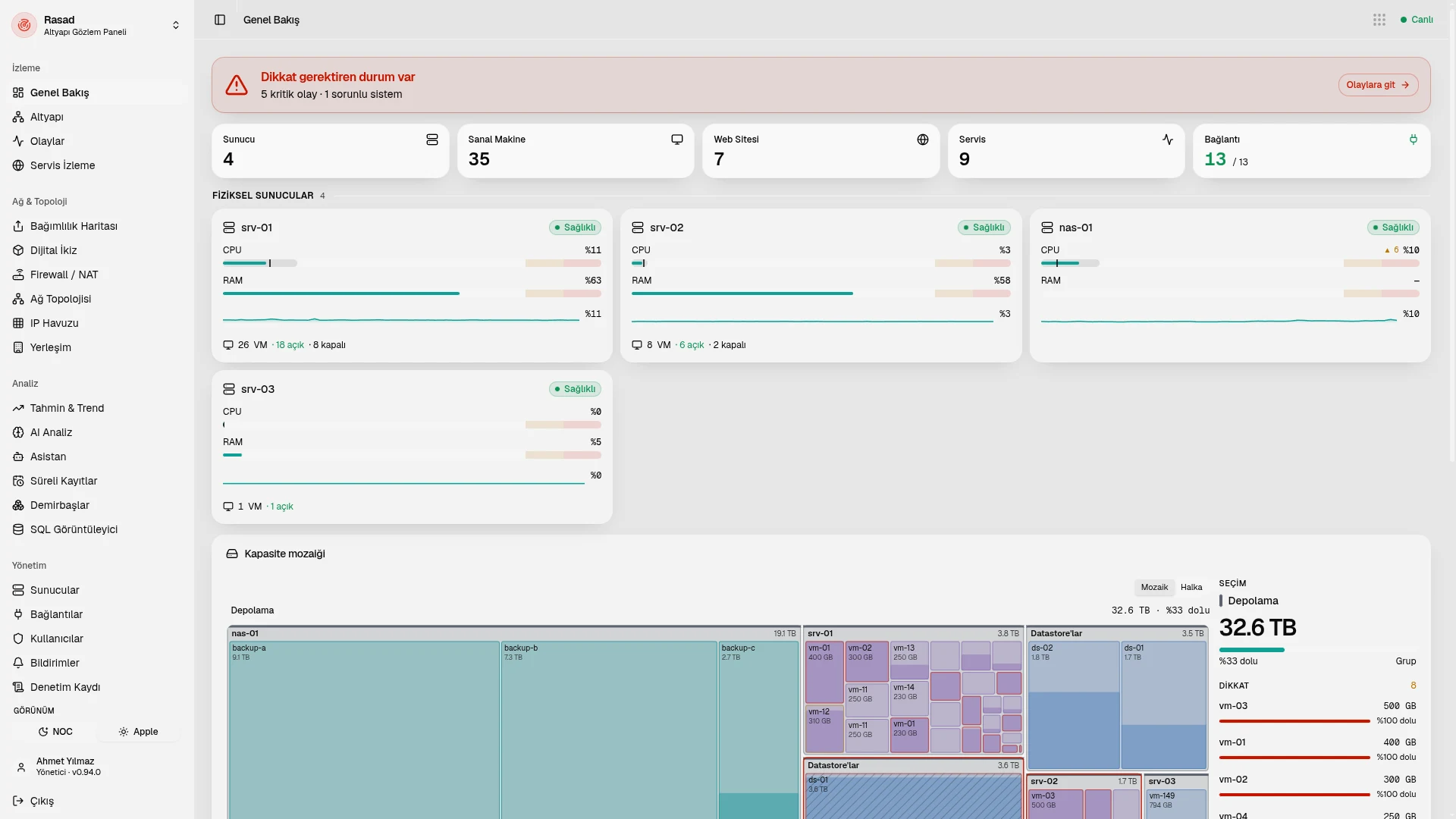
At a glance
The problem: one infrastructure, nine screens
Virtualization in one panel, storage in another, network devices in a third, websites and containers in a fourth. Yet the questions are always the same: "Which VM does this public IP go to? Did the backups run last night? What changed on the firewall yesterday? How many days until the disk hits 90%?"
Who it is for
Small IT teams and one-person operations, hosting companies, organizations migrating away from VMware, and public and regulated sectors that cannot let their data leave.
How it works
- Install it on your own server. Rasad is installed on your server with Docker Compose and unlocked with a license key.
- Connect your sources. You connect to virtualization, storage, network and hosting panels read-only.
- Place the Rasad Agent. The single-file agent finds the services and backups running on a server by itself; a fleet token handles bulk installation.
- See your infrastructure. An infrastructure tree from physical server to VM, panel, application and container, plus a live overview, is ready.
- Hear about problems early. Service monitoring, forecasts, expiry records and notifications reach you before you notice the issue.
- Ask your infrastructure. Ask the local AI assistant about your infrastructure and read the infrastructure report generated automatically every day.
What it connects to
Rasad connects to all of these read-only.
| Area | Sources |
|---|---|
| Virtualization | vCenter/ESXi, Proxmox, XCP-ng, Nutanix AHV, Harvester, Hyper-V |
| Storage (NAS) | TrueNAS, OpenMediaVault, Unraid, Rockstor, XigmaNAS (via SNMP) |
| Hosting and application panels | aaPanel, cPanel/WHM, Plesk, DirectAdmin, CyberPanel, HestiaCP, CWP, ISPConfig, FASTPANEL, Webmin/Virtualmin, OpenPanel, CapRover, Coolify, IIS, WordPress, Dokploy, Portainer |
| Network | MikroTik, FortiGate, Palo Alto, Meraki, UniFi, OPNsense; vendor-neutral SNMP v2c/v3 (9 vendor profiles); Prometheus/OpenMetrics (14 profiles) |
| Monitoring tools | PRTG, Zabbix, Checkmk: it does not write to them; it works alongside them or replaces them with the migration assistant |
See it
Infrastructure tree
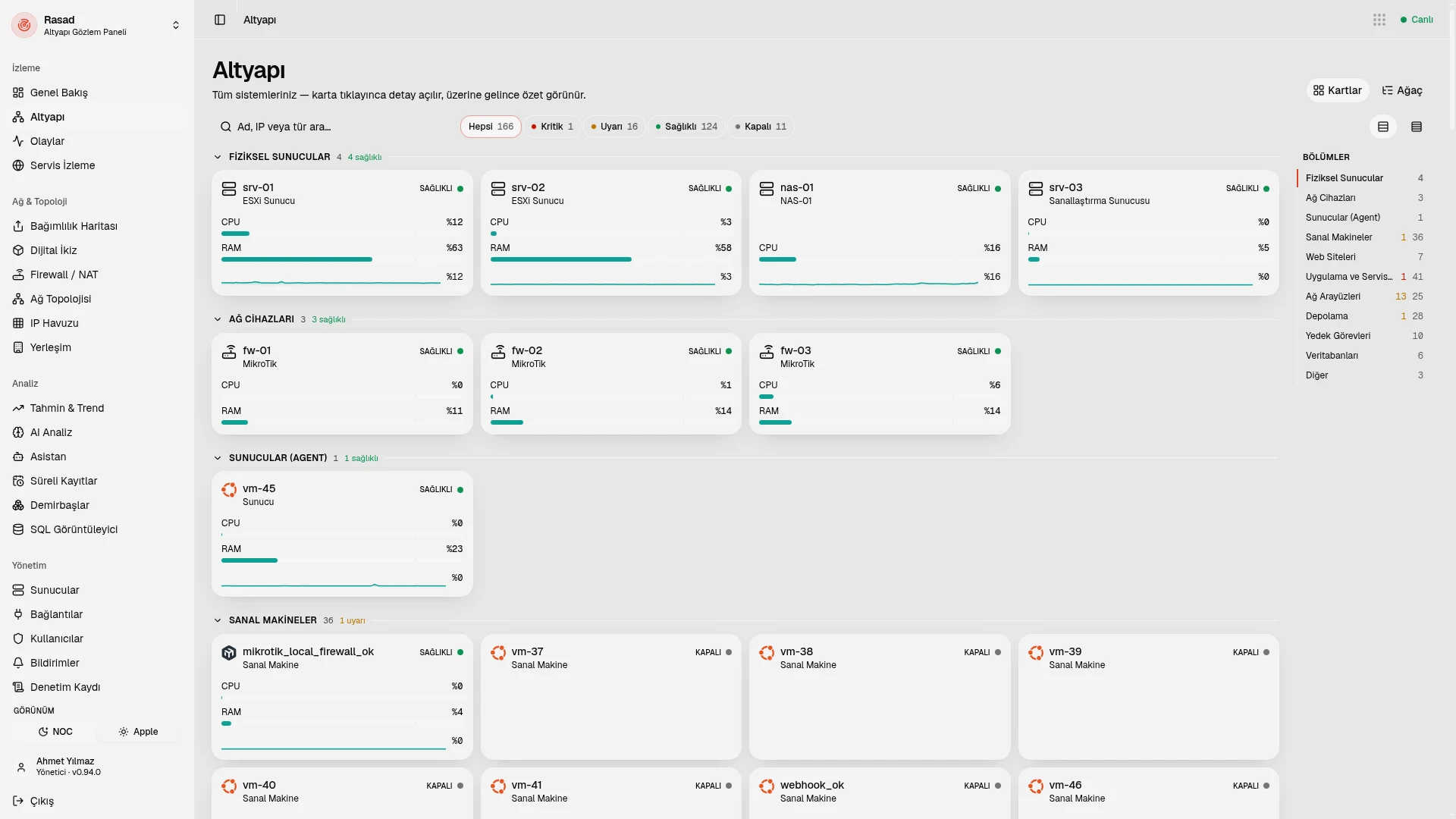
Everything from the physical server to the VM, panel, application and container sits in one tree. The dependency map shows what depends on what.
Live overview and charts
The live state of the whole infrastructure on one page; metric charts come in 1-hour, 24-hour, 7-day and 30-day views.
Events
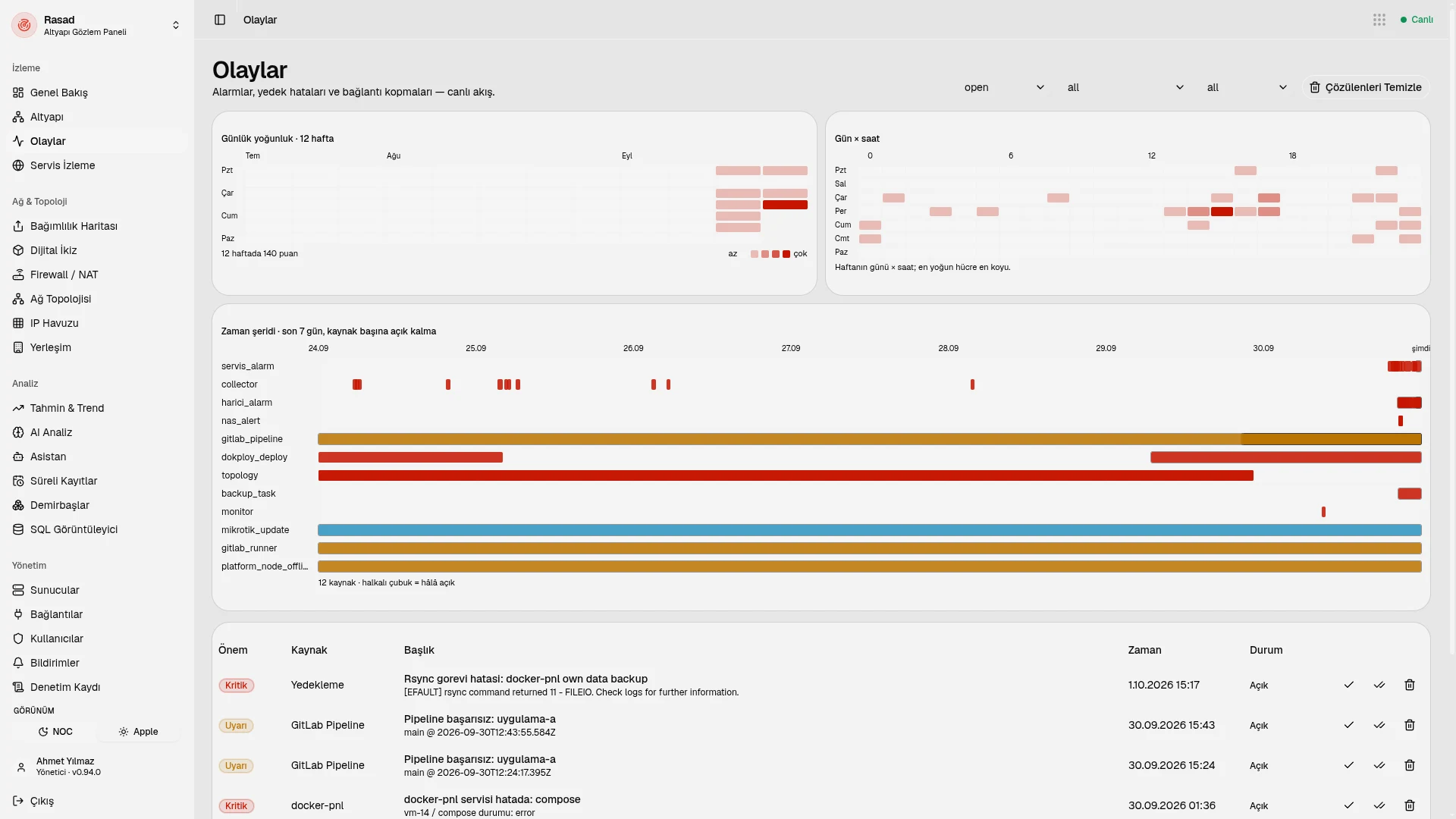
Events from more than 33 sources are collected in a single stream; when the cause goes away, the event closes by itself.
Digital twin and layout
Watch your infrastructure as a 2D, isometric or 3D digital twin. The site, floor, room and rack layout with a map works on closed networks too.
Assets and CMDB
Import from Excel/CSV, get warranty warnings and QR labels, and keep your inventory in one place.
Understand the network
NAT analysis
Finds which VM a public IP:port goes to.
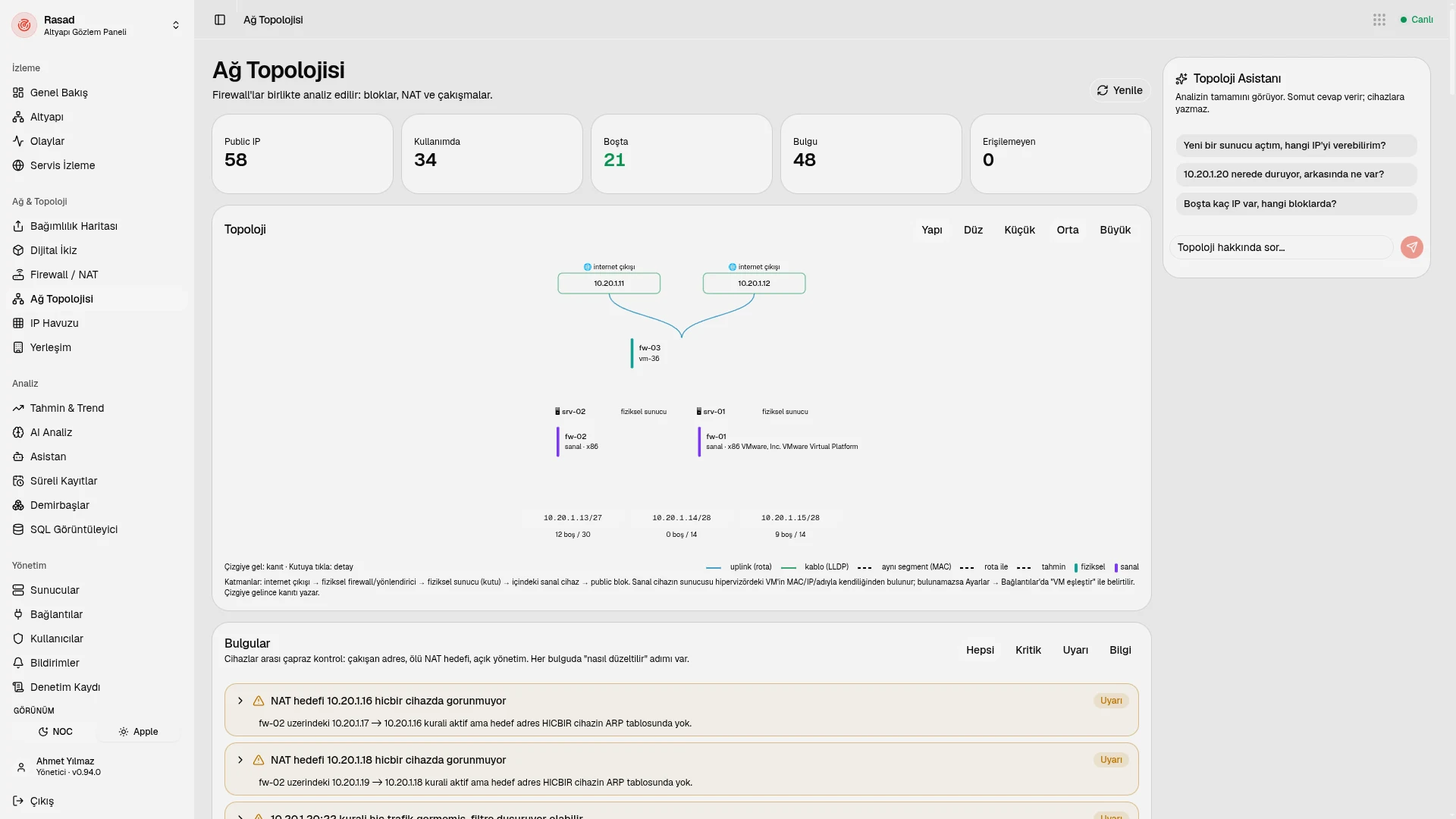
Network topology
Draws how devices are connected to each other.
Configuration snapshots and diffs
Takes snapshots of device configuration and shows the difference between two points in time. This answers "What changed on the firewall yesterday?"
Switch MAC table and IP pool
Look up the switch MAC table and manage your IP pool (IPAM) in one place.
Hear about it first
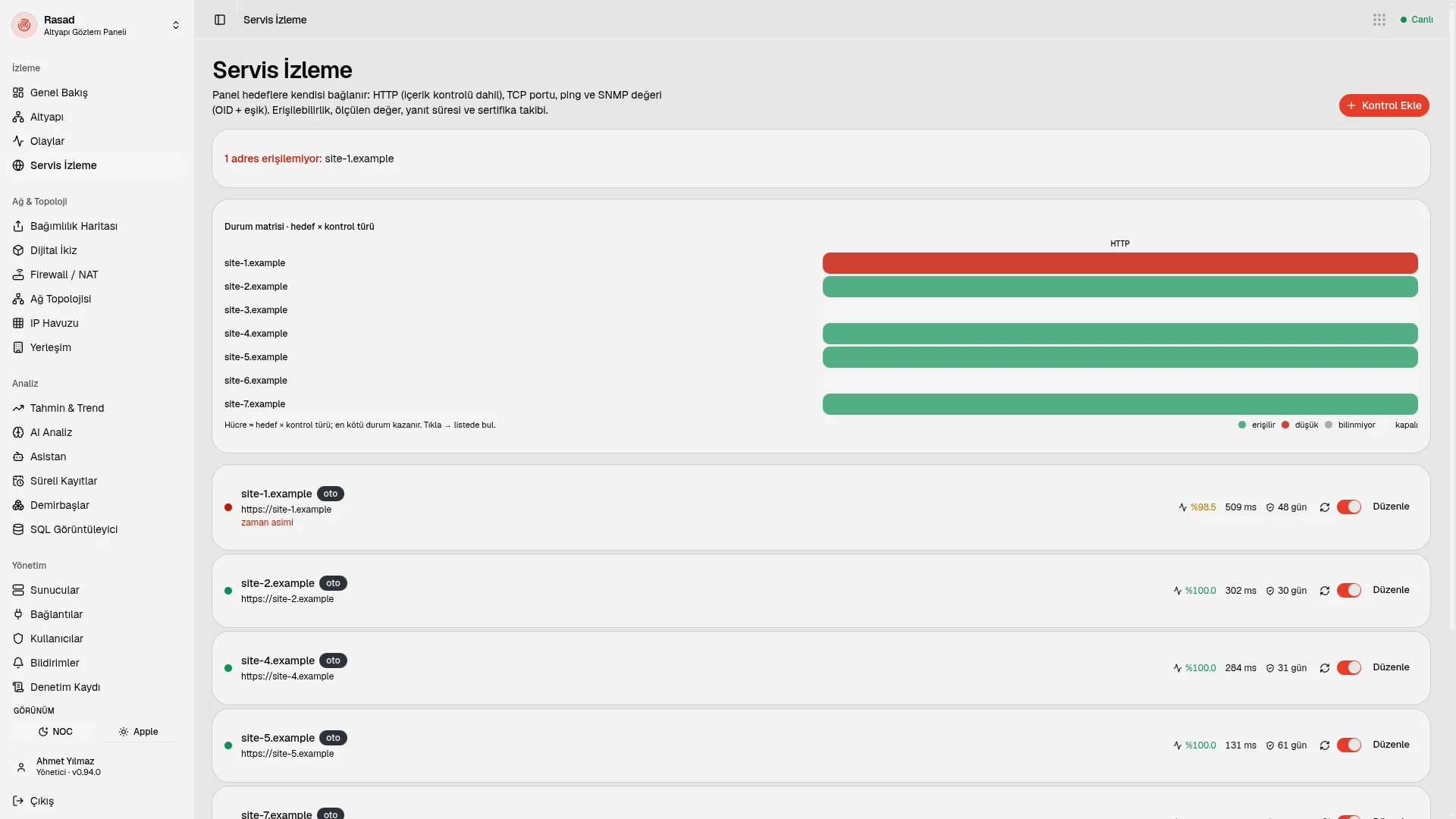
Service monitoring
HTTP (with content checks), ping, TCP, SNMP OID, service status and command checks.
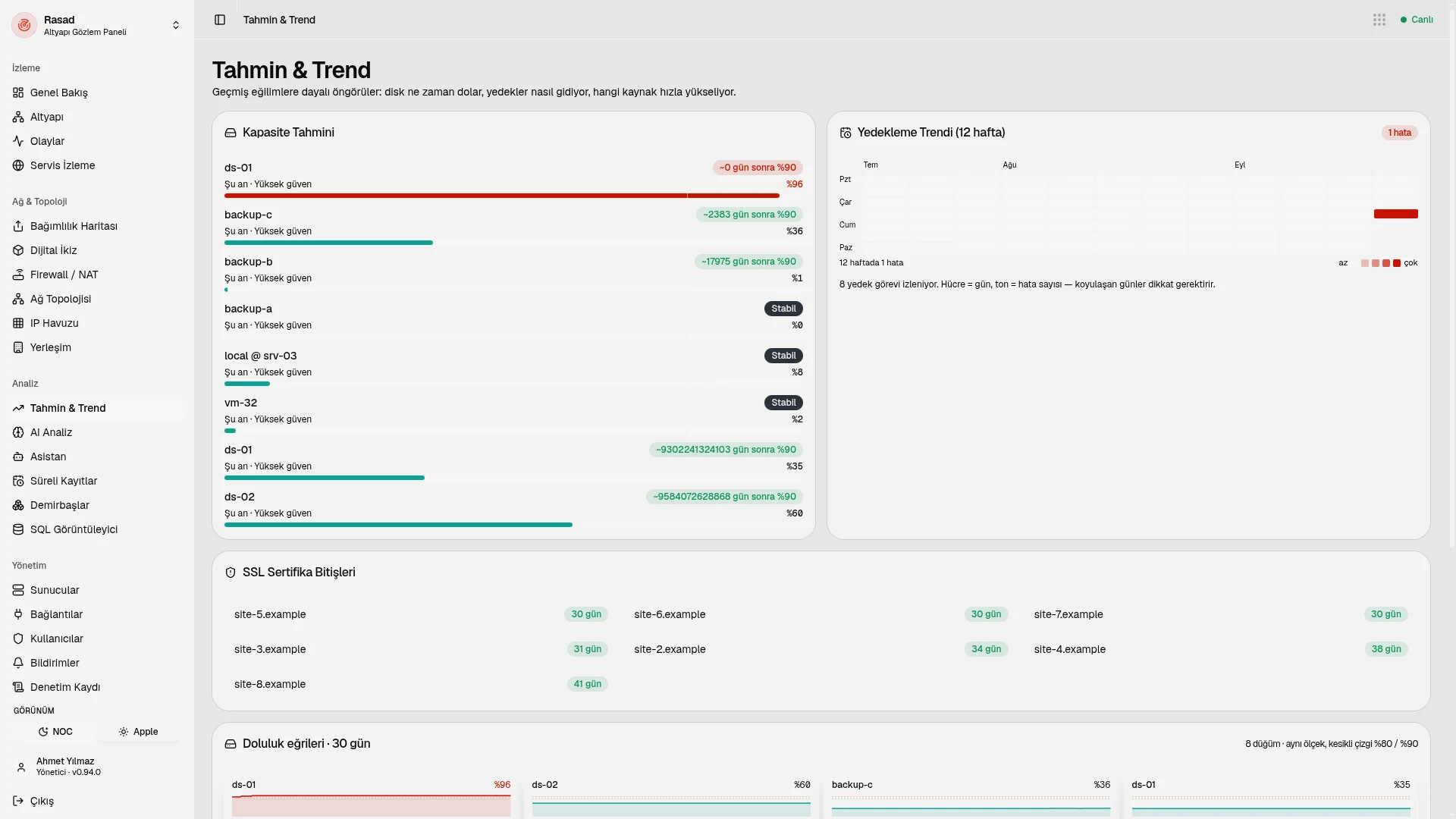
Forecasting
Answers "How many days until the disk hits 90%?" with a confidence measure.
Expiry records
Licenses, domain names and contracts trigger warnings 30, 7 and 1 day before they expire.
Notifications
Email, Telegram and webhooks (Slack/Discord compatible); quiet hours can be defined.
Rasad Agent
One file, every platform
A single-file agent that runs on Linux, macOS and Windows, on amd64 and arm64.
Encrypted reverse tunnel
The agent connects from the server to Rasad, so there is no need to open a port on the server.
Finds things itself
It finds around 60 product services and backups (restic, borg, pgBackRest and others) by itself.
Web terminal
Connect to a server from the panel with the web terminal when needed.
Signed automatic updates
The agent updates itself with signed updates.
Bulk installation
Install on many servers at once with a fleet token. The installation token is single-use and valid for 30 minutes.
Local AI and license management
A chat assistant for your infrastructure
Ask the assistant about your infrastructure; the tool it runs is visible on screen. Passwords and keys never go to the model.
Daily automatic report
An infrastructure report is generated automatically every day.
License management
For companies that sell software: customer, product, term, seats, payment due date and suspension together; verification can be done offline.
The AI model runs on the customer's own server, on their own Ollama; infrastructure content does not go to any third party.
Observation, not intervention
Read-only by default
Writing to the infrastructure is tied to a single switch, opened for a limited time, and every change goes into the audit log.
Your data stays at home
The panel, the database and the AI model run on the customer's server; data does not leave.
Encrypted credentials and tunnel
Credentials are stored with AES-256-GCM. The agent tunnel is end-to-end encrypted (Ed25519, X25519, ChaCha20-Poly1305) and independent of TLS.
Opens no ports outward
The panel opens no ports to the outside. The installation token is single-use and valid for 30 minutes.
Roles and audit log
There are administrator and viewer roles; more than 60 action types are recorded in the audit log.
Rasad comes only as a web panel (dark "NOC" and light themes). It is installed on the customer's own server with Docker Compose and unlocked with a license key. There is no cloud (SaaS) version.
The Mubyn family
Rasad is the infrastructure observability product of the Mubyn family. You sign in through Hesap; sign in once and you are not asked for a password when moving between products. The place where your team works is Mabeyn: you can send Rasad alerts to a Mabeyn channel through a webhook.
Common questions
Does Rasad run in the cloud?
No, there is no cloud (SaaS) version. Rasad is installed on the customer's own server with Docker Compose and unlocked with a license key.
Does it write anything to my infrastructure?
It is read-only by default. Writing is tied to a single switch, opened for a limited time, and every change goes into the audit log.
Does my data leave my network?
No. The panel, the database and the AI model run on your server. Passwords and keys never go to the AI.
Do I need to open ports on my servers?
No. The Rasad Agent connects through an encrypted reverse tunnel; no port needs to be opened on the server. The panel also opens no ports outward.
I use PRTG, Zabbix or Checkmk. What happens?
Rasad does not write to these tools. It can work alongside them or replace them with the migration assistant.
Which systems does the Rasad Agent run on?
Linux, macOS and Windows, on amd64 and arm64. It is a single file and updates itself with signed updates.
Can I see whether my backups ran?
Yes. The agent finds backup tools such as restic, borg and pgBackRest by itself; they show up in events and in the overview.
Who can use it?
There are administrator and viewer roles. You sign in with Mubyn Hesap.
Let's get to know Rasad
You do not have to entrust your infrastructure to someone else in order to understand it.